Pixel Powerline: A Bold Font for Modern Design Workflows
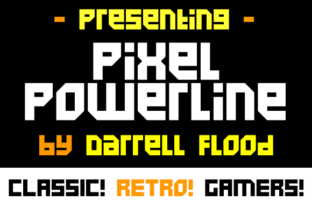
Pixel Powerline is a unique angular, pixel-style font that blends a clean, crisp aesthetic with a dynamic visual identity. Its structured yet expressive design makes it ideal for projects that require a strong, recognizable presence. Whether you're working on a game concept, a sci-fi-themed campaign, or a digital interface, Pixel Powerline offers a versatile and eye-catching solution.
This font isn't just about style—it's about purpose. It fits naturally into creative workflows where clarity and impact are essential. From initial brainstorming to final execution, Pixel Powerline can enhance the visual language of your work without overwhelming it.
Understanding Pixel Powerline in the Design Process
Before diving into specific use cases, it's important to understand how Pixel Powerline functions within a broader design process. As a display font, it's best suited for headlines, logos, and other prominent text elements. Its pixelated structure gives it a retro-futuristic feel, making it particularly effective in gaming and sci-fi contexts.
When planning a project, consider the tone and message you want to convey. Pixel Powerline works well when the goal is to evoke a sense of innovation, energy, or nostalgia. It pairs well with modern design tools like Adobe Illustrator, Figma, and Canva, allowing for seamless integration into existing workflows.
Using Pixel Powerline in Different Stages of a Project
Pixel Powerline can be applied at various stages of a project, depending on the goals and requirements. During the early planning phase, it can help define the visual direction of a concept. For example, if you're designing a game title screen, using Pixel Powerline as a placeholder can give stakeholders a clear idea of the intended aesthetic.
During development, the font can serve as a reference point for consistency. If your project involves multiple designers or teams, having a shared font like Pixel Powerline ensures that all visual elements align with the overall vision. This is especially useful in collaborative environments where maintaining a cohesive look is crucial.
After completion, Pixel Powerline can be used to reinforce branding across different platforms. Whether it's a website, social media post, or printed material, the font helps create a memorable and unified brand identity.
Integration with Other Tools and Resources
Pixel Powerline works well with a variety of design and development tools. In graphic design software, it can be paired with vector graphics to create sharp, scalable visuals. When used alongside color schemes and layout structures, it adds a layer of visual interest without compromising readability.
In web development, Pixel Powerline can be implemented through custom CSS or font services like Google Fonts. This allows developers to maintain control over typography while ensuring cross-browser compatibility. For mobile app design, the font's pixelated structure can enhance the user experience by providing a distinct visual cue.
Practical Implementation Tips
To get the most out of Pixel Powerline, start by experimenting with different sizes and weights. Since it's a display font, it may not be suitable for body text but can shine in headings and titles. Test it against various backgrounds to ensure legibility and contrast.
When integrating Pixel Powerline into a workflow, consider the context of use. For instance, in a marketing campaign, it can be used to highlight key messages or calls to action. In educational materials, it can add a playful yet professional touch to course titles or instructional content.
Consistency is key. If you're using Pixel Powerline in multiple projects, establish a set of guidelines for its application. This includes specifying where it should be used, how it should be sized, and what other fonts it should be paired with. These rules help maintain a cohesive visual language across all outputs.
Workflow Examples and Use Cases
For a game developer, Pixel Powerline could be used to design the main menu or character names. Its angular style complements the visual themes of many indie games, offering a fresh alternative to more traditional fonts. Pairing it with bold colors and geometric shapes can create a striking visual identity.
A sci-fi themed blog might use Pixel Powerline for article titles to draw readers in. The font's futuristic feel aligns with the genre, making it an effective tool for engaging an audience interested in speculative fiction or technology.
Entrepreneurs launching a tech startup could incorporate Pixel Powerline into their branding. It provides a modern, innovative look that resonates with audiences looking for cutting-edge solutions. When used in logos, websites, or promotional materials, it helps establish a strong visual presence.
Factors to Consider for Long-Term Use
When planning to use Pixel Powerline long-term, consider factors like scalability and adaptability. As your projects evolve, the font should remain relevant and functional. Regularly review how it performs in different formats and adjust as needed.
Compatibility is another important factor. Ensure that the font works across all devices and platforms, especially if it's being used in digital products. Testing on various screen sizes and resolutions can help identify any issues with legibility or appearance.
Finally, think about how Pixel Powerline fits into your overall design strategy. Does it support your brand's messaging? Does it enhance the user experience? By answering these questions, you can make informed decisions about its continued use.
Conclusion: Making Pixel Powerline Work for You
Pixel Powerline is more than just a font—it's a tool that can elevate your design work and strengthen your visual communication. By understanding its strengths and limitations, you can integrate it effectively into your workflow and achieve consistent, high-quality results.
Whether you're a designer, developer, marketer, or creator, Pixel Powerline offers a versatile and impactful way to express your ideas. With careful planning and practical implementation, it can become a valuable asset in your design toolkit.